Wednesday, September 20, 2017

How to Create Trail Account (Worth $300) in Alibaba Cloud (Aliyun)

Go to this link [OR] Go visit https://www.alibabacloud.com/campaign/free-trial and then click on "Free Account" in right top corner.
You will be presented with below screen, fill the details and click on confirm to move further;
You will be prompted to verify the email address for getting successful registered as Alibaba Cloud User.
In next step, you need to select account type (individual or corporate) and provide a billing address.
Then select a payment method (Credit Card or PayPal). If you select PayPal, then it will redirect you to PayPal.com to sign up for a Billing Agreement with Alibaba Cloud. This Billing Agreement will allow Alibaba Cloud to charge you for your purchases directly from your PayPal account.
If you select Credit Card then you need to provide Card Information (Note: Debit Card also works) and then click "Next" to verify ownership of Credit Card.
There are 2 options (by transaction code or by transaction amount) to verify ownership of Credit Card. Go with the one which works best with Credit Card you have.
If you go with "transaction amount (USD)" for verification then you need to do the following if you are in India;
  1. If your card's statement shows transaction amount in USD then just enter the amount which got charged to your card and click on submit.
  2. If your statement shows in INR then try dividing the amount by 64.25 and whatever is the result put there and click on submit (Note: you will be charged twice, look at the 2nd transaction and not the 1st one). In below example 21.31/64.25=0.33, so put 0.33 and submit for verification.
3. If nothing works, open a ticket with Alibaba Cloud and they will help you out.
As soon you are done with this, you will be presented with console as shown below and you are ready to get started;
What you get in Free Trail can be found here: https://www.alibabacloud.com/campaign/free-trial
If you want to check where this credited $300 show up? then select "Billing Management" and go to "Coupon Management"
                                                                                                               Courtesy: IUG & Mazhar Mirza

Friday, October 16, 2015

Synchronizing Active directory on AWS instance with Azure Active Directory Connect


you need :

An instance on Amazon Web Services with Windows OS
Install the AD DS role in that server
you Microsoft Azure Subscription

  Logon to the Azure Management Portal 


    Open the Active Directory configuration area

Click on Default Directory


               Click Users
             Click Add User ADConnectUser and click Next (you can give any name for the user)
            Enter the following information for the new user.

          Click Next
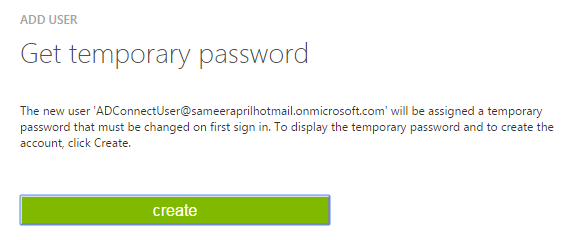
          Click on CREATE button to get a temporary password

         Click Complete.

Copy the email address of the new user and password. Save it in a notepad.

Open Settings tab from the left pane of Azure management portal


Click on Administration Tab and Click Add

Put the email address of the ADConnectuser and select your subscription.

Click Complete

Logon to your portal as ADConnectuser (your user id) using the email address and temp password.
Change the password at first logon.  

SignOut from the portal without any activity.


Connect to your AWS instance which has the AD DS role installed.


Open the azure management portal and login with the account that you began the lab with. Download the Azure AD connect package.


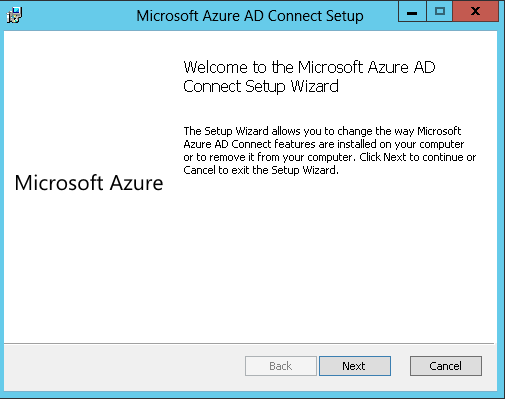
Launch the installation for "AzureADConnect.msi".


Enter your Microsoft Azure credentials of the new user and click next


Next, Enter the Active Directory credentials of you admin account and click next


Review and Click install


Once the initial Sync is completed you can go Azure management portal, click on Active directory and go to User tab.

you can find all the users created in the local directory.


How to create a VPN connection between two VPCs on Alibaba Cloud

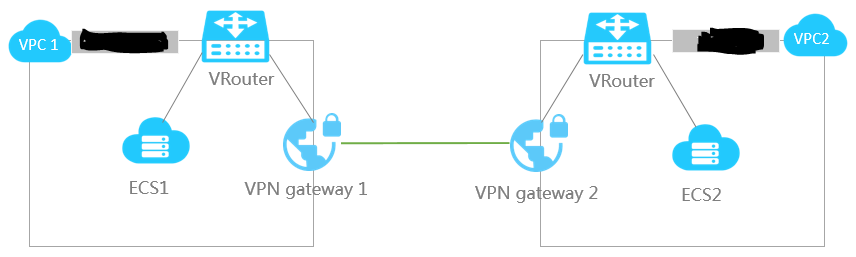
How to create a VPN connection between two VPCs on Alibaba Cloud Here’s my Scenario, VPC name CIDR block VPC ID Cloud prod...